
A seed phrase is access to your funds. Not a password to an app, not an extra layer of protection, but the key itself. A device can break, get soaked or be left in a taxi: with the phrase the wallet is restored on any other device and the funds are still there.
Losing the phrase along with the device means losing the funds for good. There is nobody to restore them and nobody to appeal to: a wallet has no support desk that can see your balance and no "forgot password" button.
Hence the single rule everything else starts from: never enter the phrase anywhere except your own wallet during recovery.
What twelve or twenty-four words actually are
They are a human-readable form of a private key. The words come from a standard list, and their order uniquely defines every address of the wallet and the right to dispose of them. A wallet does not "store" cryptocurrency inside itself: the coins sit on the blockchain, and the device only signs operations with a key derived from those words.
That is why the device is secondary. It costs money, you can buy a new one, enter the same phrase and see the same balance at the same addresses. The phrase is primary, and nothing can replace it. Whoever has the words has the money, no matter where they are physically or whether they hold your device.
Why a photo in your gallery kills a cold wallet
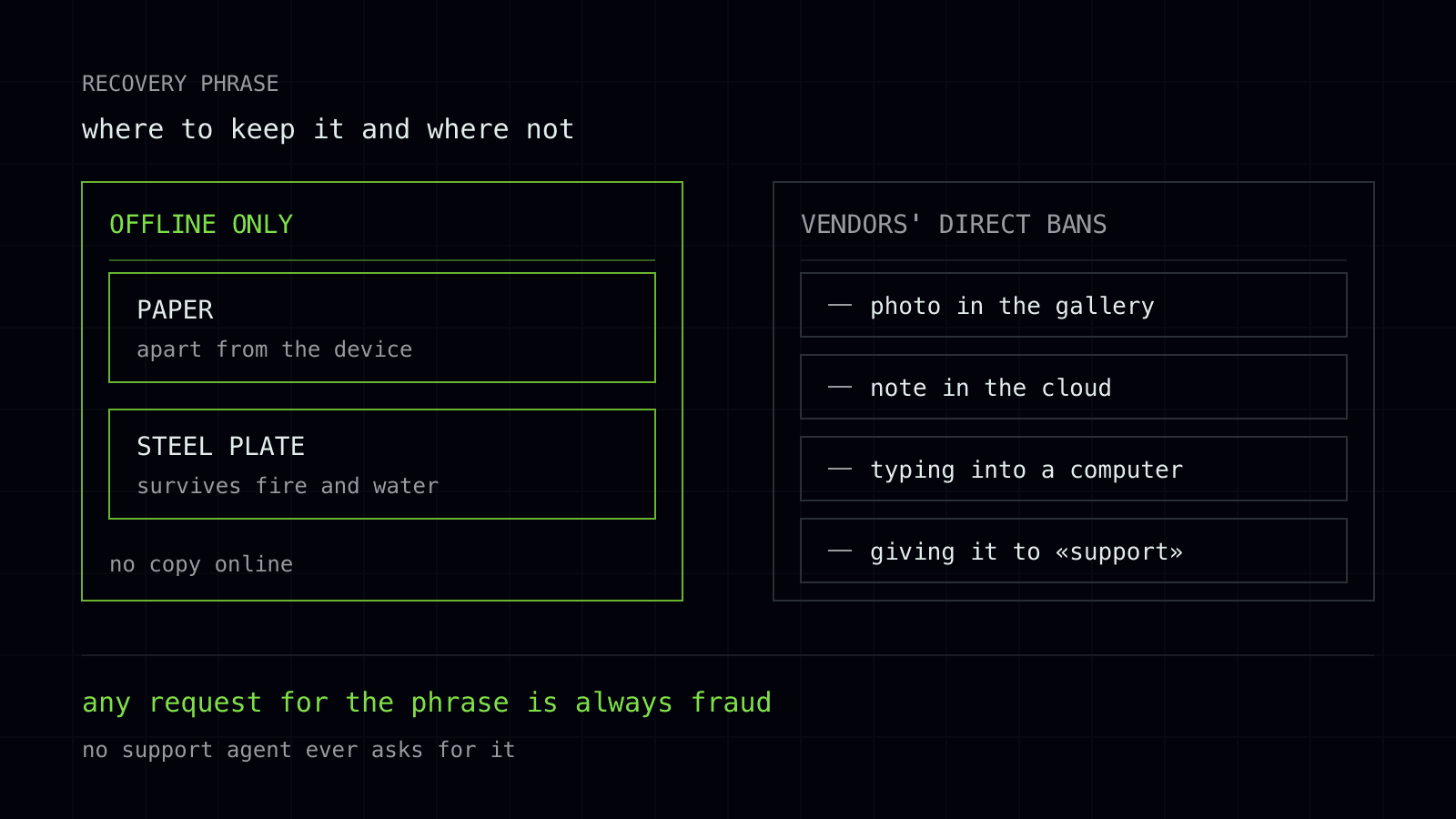
The whole point of a cold wallet is that the key has never been online. The moment the phrase lands in a photo on your phone, in a note, in a message to yourself or in a cloud sync, the key is online. A thirty-dollar device or a two-hundred-dollar one changes nothing after that: it has stopped being cold.
Your gallery syncs to the cloud automatically. So do your notes. Access to a cloud account is restored by email or SMS, and that is already a chain with a mobile operator and human error in it. Text recognition on images runs inside cloud services by default, which means your words become searchable text.
A screenshot taken while setting up a wallet is the most common mistake, and it cannot be undone: once a phrase has been in the cloud, it is treated as compromised for good.
How people actually store the phrase
The basic method is paper, written by hand, kept apart from the device. Its advantage is that it has nothing to do with any network.
The drawback, stated honestly: paper burns, gets wet, fades in the sun, gets thrown out during a clear-out and found by strangers. One copy in a drawer next to the device saves you from neither fire nor theft, because both usually take everything at once.
The second approach is to spread copies, or parts of the phrase, across different physical places. That lowers the risk of everything disappearing at once.
There is a drawback here too, and a serious one: the more parts there are, the greater the chance you will not reassemble them yourself a year later. Losing one part of a scheme you invented yourself can mean losing everything, and your heirs will not solve that puzzle at all.
The third is metal plates with the words stamped into them. They survive fire and water better than paper. The drawback: they are no protection against a person.
A plate can just as easily be found, photographed and put back, and you will never know. On top of that come the cost and the time of stamping, which is why people put off the transfer and live for months with a temporary scrap of paper.
There is no perfect method. There is a choice about what you are protecting against first: the elements, theft, or your own forgetfulness.
Who asks for your phrase and why
Nobody with a legitimate need ever asks for the phrase. Not wallet support, not a trading venue, not an exchange service, not a "wallet screening check". Sending funds needs an address, verification needs documents, and support needs a description of the problem.
Any field saying "enter your 12 words" outside the recovery screen of your own wallet means theft.
The most common scenarios go like this. Fake support: you post in an official chat and within a minute an "administrator" messages you privately offering help. A counterfeit app: a copy of a well-known wallet in an app store or on a site from an ad, which at the very first step asks you to "import an existing wallet".
"Synchronisation": an email or a pop-up saying the wallet must urgently be synced with a new version of the network. A "screening check" through an AML service that for some reason demands the words rather than the address.
The common thread is urgency. You are being rushed, because given a calm moment a person remembers the rule.
What to do if the phrase is compromised
Act immediately, without first working out whether anyone has used it yet. Create a new wallet with a new phrase on a clean device and move all funds there. Treat the compromised wallet as someone else's: access to it is no longer yours alone, and leaving even a small amount on it makes no sense.
A phrase counts as compromised if it has been in a photo, in the cloud, in a messenger, on a computer with a virus, if you entered it on a third-party site, or if it was seen by someone you did not intend to give your money to. Changing the app password does not help here: a password protects the device, not the key.
What to do if the phrase is lost
Separate two situations. If you still have access to the wallet on the device, you are living on borrowed time: create a new wallet today, write its phrase down securely and move the funds. One dead battery, one update or one factory reset, and there will be nothing left to restore from.
If access is already gone and the phrase is gone too, the funds cannot be recovered. This is not a formality and not a refusal: there is simply no participant in the system with the technical means to do it. Anyone offering to "restore your wallet for a percentage" is running a scam. We are an exchange service and have no influence on client wallet balances; our part of the work begins with an address, not with a key.